
How to Recognize Your Car’s High-Beam Indicator
During a temporary flash, the blue indicator may illuminate only while the control is held and disappear when it is released.
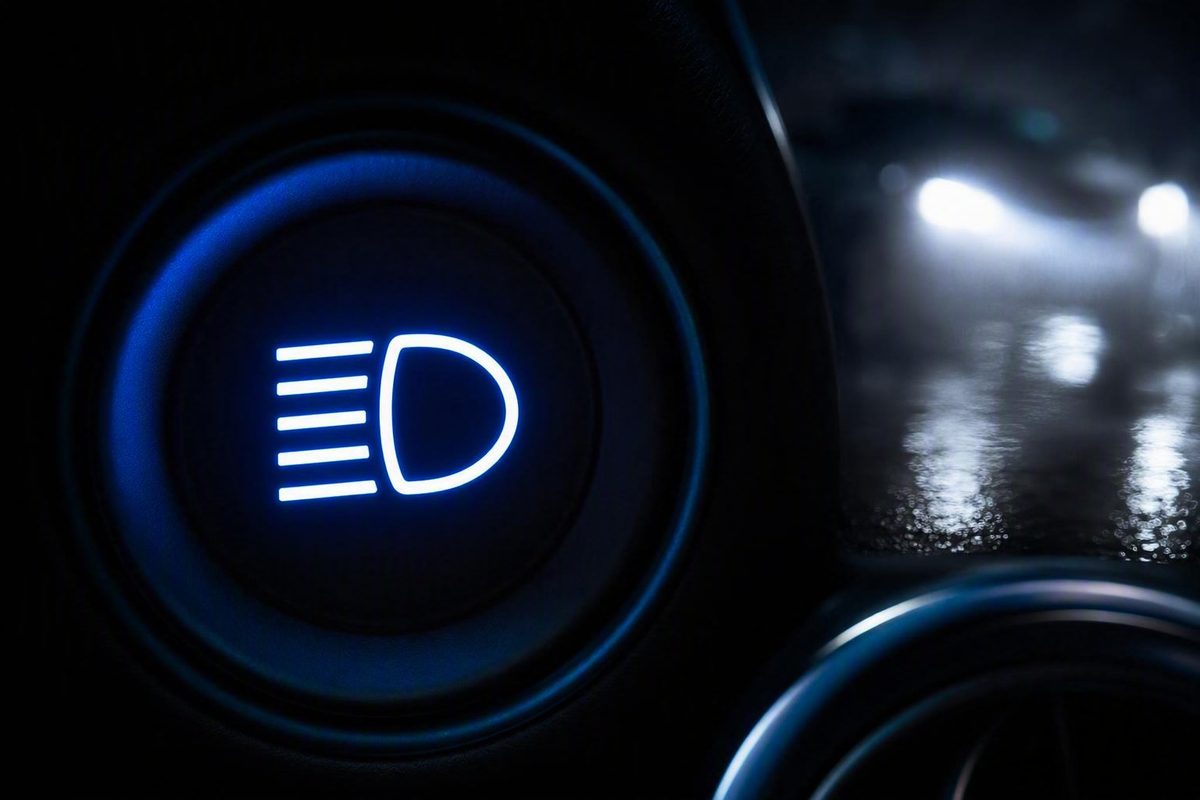
The high-beam symbol at a glance
The symbol for high beams typically looks like a headlamp viewed from the side, with several straight, horizontal rays pointing forward. On most dashboards, the indicator illuminates blue.
When the blue icon appears, it normally means that:
- The high-beam headlights are switched on continuously; or
- The temporary high-beam flash function is being used.
It is generally an operating-status indicator, not a warning that something is wrong. The CarParts.com guide to headlight indicators likewise describes the usual symbol as a side-view headlight with horizontal lines and says the indicator commonly illuminates blue in high-beam mode.
A concise textual identification aid is:
Blue side-view headlamp icon with straight horizontal light rays pointing forward.
The most useful clues are the blue illumination and the generally level beam lines.
If your dashboard symbol differs slightly from the common design, check the lighting-symbol section of the owner’s manual. A different rendering does not necessarily represent a different function, but vehicle-specific documentation is the best way to confirm it.
How to read the shape of the icon
The high-beam icon has two basic visual elements:
- A lamp outline: A simplified headlamp housing viewed from the side.
- Beam lines: Several rays extending forward from the lamp.
The beam lines are the strongest identifying feature. For high beams, they normally appear straight and approximately horizontal, suggesting light projected directly ahead.
Descriptions of the rays are not perfectly consistent. They may be called horizontal, straight, level, or occasionally wavy in a stylized graphic. These wording differences do not necessarily indicate different lighting modes. Focus on the overall direction: high-beam rays extend generally straight forward.
A simple text approximation looks like this:
( headlamp )  ───
              ───
              ───
This is a representative rendering, not an exact reproduction of a manufacturer’s symbol or a universal, standards-verified diagram.
By comparison, rays that angle downward usually identify low beams.
Dashboard icons may also be simplified or restyled to fit a particular display. The line thickness, spacing, proportions, and level of detail can differ. The NAOEVO guide to headlight symbols describes the common high-beam indicator as a blue headlamp icon with horizontal, forward-pointing rays, while noting that vehicle controls and designs can vary.
When examining an unfamiliar icon, ask:
- Does it contain a side-view headlamp shape?
- Do the rays point approximately straight ahead?
- Does it appear when the high beams are selected or briefly flashed?
If all three are true, it is likely the standard high-beam indicator. If the icon includes unfamiliar letters, warning marks, or other additions, consult the owner’s manual rather than identifying it from resemblance alone.
High-beam versus low-beam symbols
High- and low-beam indicators both use a lamp-and-rays design. The clearest difference is the direction of the rays.
| Feature | High beam | Low beam |
|---|---|---|
| Typical color | Usually blue | Commonly green |
| Direction of rays | Straight or horizontal, pointing forward | Angled downward toward the road |
| Lighting mode | Brighter, longer-range illumination | Downward-directed illumination for ordinary nighttime driving and use around other traffic |
| Normal meaning when illuminated | High beams are active or being temporarily flashed | Low or dipped-beam headlights are active |
A useful memory rule is:
Straight ahead means high; sloping down means low.
Color reinforces the distinction, but ray direction is often the better clue when dashboard designs vary. A blue icon usually points to high beams, while a similar green icon commonly represents low beams.
The visual difference reflects the functions of the two settings. High beams provide stronger, longer-range illumination for dark roads. Low beams direct light more toward the roadway and are used for routine nighttime driving, including situations involving other traffic.
Do not rely on perceived headlight brightness alone.
A vehicle may also display separate indicators for other exterior-light functions. Because the supplied evidence does not establish universal designs for fog, adaptive, or automatic-light symbols, those icons should be identified through the owner’s manual rather than by comparison with the high- and low-beam symbols alone.
What an illuminated blue icon is telling you
An illuminated blue high-beam icon reports the current lighting-system status: the vehicle is operating in high-beam mode at that moment.
The icon may behave in either of these ways:
- It remains illuminated: Continuous high beams may be selected.
- It appears only while a control is held: The temporary flash function may be active.
A brief appearance can therefore be normal. In vehicles with a momentary flash control, releasing that control returns the headlights to their previous mode and the blue indicator disappears.
The blue status light should not be confused with a lighting-fault indicator. Dashboard lighting symbols can report either an active function or a possible problem, and their designs can differ among vehicles. The standard high-beam icon normally belongs to the first category: it confirms that high-beam operation has been selected or requested.
By itself, the icon does not establish that a bulb, fuse, stalk, sensor, wiring circuit, control module, or instrument display has failed. It also cannot diagnose why the displayed status and the apparent headlight operation might not agree.
If the icon appears unexpectedly, check the lighting-control position and compare its behavior with the owner’s manual. The manual can establish:
- Which symbol identifies the standard high beams;
- How continuous and temporary high-beam operation are controlled;
- Whether the vehicle has an automatic high-beam function;
- What any accompanying letters or warning marks mean; and
- Whether the observed indicator behavior matches the documented operation.
If the display remains inconsistent with the vehicle’s instructions, obtain guidance for the specific make, model, market, and model year rather than inferring an electrical fault from the icon alone.
How high beams are commonly switched and flashed
Many vehicles use a steering-column or turn-signal stalk to control the high beams. A common arrangement is to push the stalk away from the driver to engage continuous high beams and pull it toward the driver for a temporary flash.
That is a common layout, not a universal instruction.
It helps to distinguish continuous operation from temporary flashing.
Continuous high-beam operation
In continuous mode, the high beams remain on after the driver releases the control. The blue dashboard indicator normally stays illuminated to confirm that the mode is active.
Returning to low beams requires operating the relevant control again. Because control movements vary, do not assume that a stalk in an unfamiliar vehicle will work exactly like one you have used before.
Temporary flash operation
The temporary flash function activates the high beams only while its control is being held. The blue indicator may appear for the same short period and go out when the control is released.
This explains why the icon can illuminate for only a second even though the high beams were never left on continuously. A brief appearance that consistently corresponds with a brief control movement may be normal for that vehicle.
Before using the lighting controls in an unfamiliar vehicle, identify them while safely stationary and consult the owner’s manual if their operation is unclear. This is particularly important when the controls do not follow the familiar stalk arrangement or when the dashboard shows more than one high-beam-related indicator.
The dashboard icon provides confirmation, not universal operating instructions. It can tell you that the high beams are active, but it cannot tell you which movement or command will switch them off in every vehicle.
When to use high beams—and when to dim them
High beams provide brighter, longer-range illumination and are useful on dark roads where visibility is limited. Their suitability depends on traffic and weather, not simply on how dark the road is.
When the blue indicator appears, make a quick assessment:
- Is the road dark enough to benefit from high beams?
- Is traffic approaching?
- Are weather conditions causing glare or reflected light?
- Does the setting still improve your view of the road?
Drivers should change to low beams when approaching oncoming traffic. The blue indicator is a useful reminder to reassess the setting as traffic conditions change, and the Neil Huffman Honda dashboard-light guide likewise advises drivers to dim high beams for oncoming vehicles.
This article does not provide a universal dimming distance or jurisdiction-specific legal rule. Drivers should follow the requirements that apply where they are driving.
High beams can also be less effective in fog, heavy rain, or snow because reflected or scattered light may return toward the driver and reduce visibility. AutoZone’s comparison of high- and low-beam headlights notes the longer-range function of high beams and explains that adverse weather can make them a poorer choice than low beams.
A practical decision process is:
- Notice the indicator. Confirm that high beams are active.
- Check for approaching traffic. Change to low beams when necessary.
- Assess the weather. If reflected light is reducing visibility, choose the more appropriate lower-beam setting.
- Continue monitoring. A setting that suits an empty road may become unsuitable as conditions change.
The blue icon reports the selected lighting mode. It does not determine whether that mode is appropriate, so the driver must continue assessing the road, traffic, and weather.
Standard and automatic high-beam indicators
The standard high-beam indicator confirms that the high beams are active. It can appear when they are selected continuously or while the driver uses the temporary flash function.
An automatic high-beam indicator has a related but more specific meaning: it can signify that the vehicle’s automatic system has switched on the high beams. The available evidence does not establish one universal color, shape, lettering treatment, or display behavior for that indicator.
The GOFAR overview of vehicle lighting symbols describes an automatic high-beam indicator as showing that the automatic system has switched on the high-beam headlights, while cautioning that dashboard colors and designs may differ by vehicle.
Because the automatic indicator is vehicle-specific, use the owner’s manual to determine:
- Which icon represents the standard high beams;
- Which icon relates to automatic high-beam operation;
- How the automatic function is enabled or disabled; and
- How to return to another lighting mode.
Automatic operation does not remove the need to monitor the active lighting mode. If a high-beam indicator is visible, continue considering whether current traffic and weather conditions make high-beam use appropriate.
Avoid transferring symbol meanings or control instructions from another make or model. Similar-looking displays do not guarantee identical operation.
What to do when the indicator looks or behaves differently
Symbol designs, colors, and control behavior can vary among vehicles. If the icon does not resemble the familiar blue lamp with straight rays—or if it behaves differently from what you expect—begin with a controlled observation rather than a repair diagnosis.
Use this check sequence:
- Stop somewhere safe. Examine unfamiliar controls while safely stationary.
- Identify the current control position. Note the stalk, switch, button, or documented screen setting.
- Read the operating instructions. Find the lighting-controls and dashboard-symbol sections of the owner’s manual.
- Use only documented modes. Follow the vehicle’s instructions for low beams, continuous high beams, temporary flashing, and automatic operation if equipped.
- Observe the indicator. Note which icon appears, whether it remains illuminated, and whether it disappears when the control is released.
- Compare the result with the manual. Check both the symbol and its documented behavior.
If the icon appears only during a brief stalk pull or other momentary control action, that may be normal flash-to-pass behavior. If it remains illuminated after continuous high beams are selected, that may also be normal.
An unfamiliar symbol could instead relate to a model-specific high-beam function, automatic high beams, adaptive lighting, fog lights, or a lighting fault. Do not choose among those possibilities without vehicle-specific documentation.
For persistent or unexpected behavior, record:
- The make, model, market, and model year;
- The lighting-control position;
- Whether the ignition was on;
- Whether the icon was steady, temporary, or intermittent;
- Whether another symbol appeared at the same time; and
- Whether the apparent headlight output changed with the indicator.
These observations can help when reading the manual or seeking vehicle-specific assistance. They do not identify a defective component.
A missing, persistent, or unexpected indicator does not prove that a bulb, fuse, stalk, sensor, wiring circuit, module, or dashboard component has failed. If the behavior remains inconsistent with the manual, consult manufacturer information or have the specific vehicle assessed rather than relying on a generic symbol description.
Frequently asked questions
What color is the high-beam dashboard symbol?
It is usually blue. The common indicator combines that color with a side-view headlamp shape and straight, horizontal rays.
Colors and designs can vary, so use the ray direction as an additional clue and confirm an unfamiliar symbol in the owner’s manual.
How is the high-beam symbol different from the low-beam symbol?
The high-beam symbol typically has straight or horizontal rays pointing forward and usually illuminates blue. The common low-beam symbol has rays angled downward and is often green.
The simplest memory rule is: straight rays suggest high beams; downward rays suggest low beams.
Does the blue high-beam icon mean something is wrong with the car?
Usually not. It is generally a status indicator showing that the high beams are on or being temporarily flashed.
The icon alone is not evidence that a bulb, fuse, control, sensor, wiring circuit, module, or dashboard has failed. If its behavior does not match the owner’s manual, seek guidance for the specific vehicle.
Does the high-beam indicator illuminate when I flash the headlights?
It can. When the temporary flash function is active, the blue indicator may illuminate only while the control is held and disappear when it is released.
The precise control action and indicator behavior depend on the vehicle.
Are high-beam symbols identical in every vehicle?
No. The common version is a blue side-view headlamp with straight horizontal rays, but the color, proportions, line style, and display treatment can vary among makes, models, markets, and model years.
Automatic high-beam indicators are also vehicle-specific. Use the familiar design as a recognition aid, then check the owner’s manual when the symbol or its behavior is unclear.
The practical rule to remember
A blue side-view headlamp with straight, forward-pointing rays usually means the high beams are active or being flashed. Downward-angled rays generally identify low beams.
The blue high-beam icon is normally a status light rather than a fault warning. Because dashboard symbols and lighting controls vary, the owner’s manual remains the authoritative guide for an individual vehicle.